
Google opens SynthID Detector to everyone: check AI media at home
On October 7, 2026 Google made SynthID Detector available globally in English at synthid.com, with partner watermark checks for Google, OpenAI, NVIDIA, Kakao, and soon Apple. How home users try it and what a negative result still means.
 Michael Narehood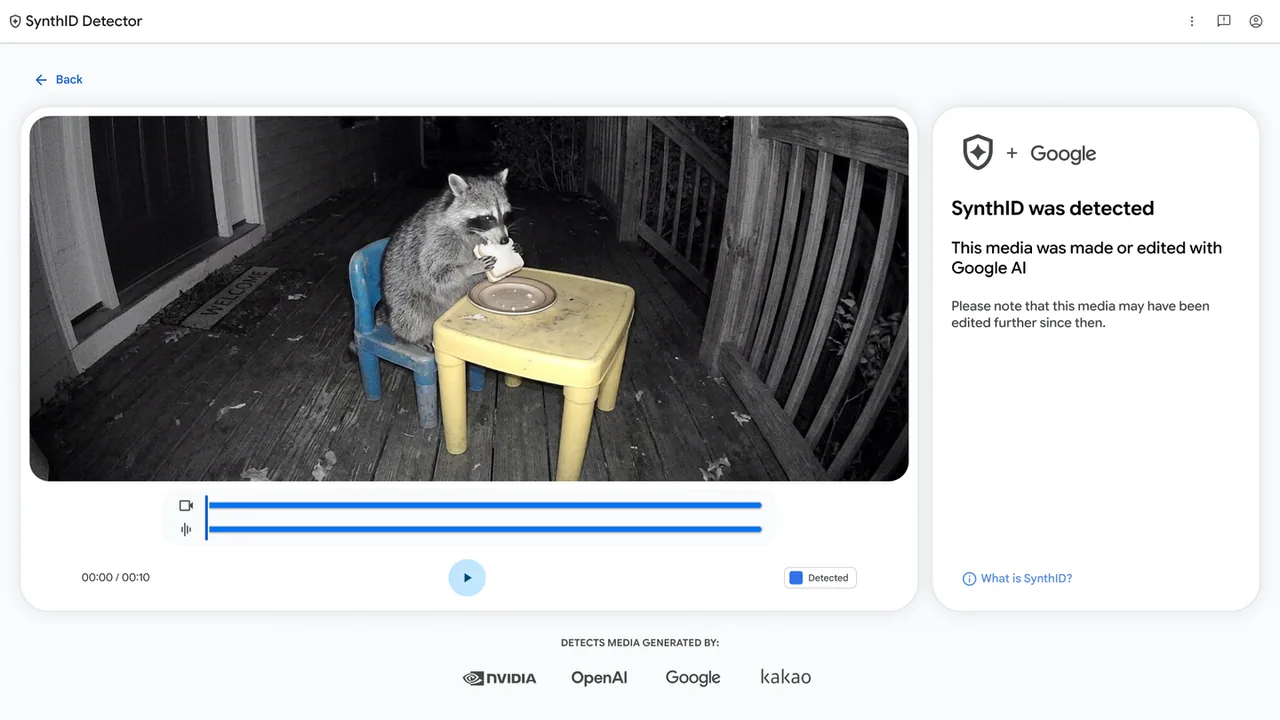
Fake photos and clipped audio are no longer a niche problem. They show up in group chats, school group texts, and local Facebook threads. On October 7, 2026, Google made its SynthID Detector available to everyone (globally, in English) so you can check whether an image, video, or audio file carries a SynthID watermark from Google or several partners.
This is a media-check tool, not a browser security patch. It still belongs next to the week’s update habits: when someone forwards a shocking clip, you need a boring place to test the file before you react.
What Google announced
Google’s DeepMind blog post, We’re making it easier to identify AI-generated content globally (October 7, 2026), says:
- An earlier SynthID Detector was aimed at media professionals.
- Access is now expanding to everyone, with the tool available globally in English starting that day.
- The detector can check whether an image, video, or audio file was made with AI from Google or partners, naming OpenAI, NVIDIA, Kakao, and soon Apple.
- Google also points at built-in verification in Search, the Gemini app, and Chrome, which the post says already handle over 1 million verification requests daily.
- The same post cites SynthID watermarking volume to date: over 180 billion images and videos, plus 240,000 years of audio content.
Google’s SynthID product page repeats the Detector expansion and the partner list. Independent reporting from Ars Technica and Android Authority (both October 7, 2026) describes the public portal at synthid.com, login with a Google, OpenAI, or Apple account, and a daily quota of roughly 10 checks.
What a SynthID check can and cannot prove
Can help with: files that still carry a SynthID watermark from a participating generator. A positive hit is useful evidence that AI tooling from a supported vendor touched that media.
Cannot prove: that a file is “real photography” or “human-recorded audio.” Plenty of AI tools do not use SynthID. Open-weight models people run at home often leave no watermark. Older AI files may predate watermarking. Clever stripping attempts exist in the wild over time even when vendors try to resist them.
Ars Technica’s October 7 piece also notes the public site gives a simpler yes/no style result rather than the richer region highlighting some internal tools showed. Treat the Detector as one signal, not a courtroom.
How to try it at home
- Save the image, video, or audio file you want to check (prefer the original download, not a heavily recompressed screenshot of a screenshot).
- Open synthid.com in a current browser.
- Sign in with a Google, OpenAI, or Apple account. Reporting from Android Authority says those are the supported login paths right now.
- Upload the file and read the result.
- Stay inside the daily quota (about 10 checks per day per the October 7 coverage). Do not burn the quota on ten near-identical crops while “testing.”
- If you only need a quick Google-AI check inside products you already use, Google’s blog also points at asking Gemini, Search, or Chrome verification flows for Google SynthID. The dedicated Detector is the broader partner-aware portal.
Keep browser hygiene in parallel. A media detector does not replace updating Chrome, Brave, Firefox, or Edge when those vendors ship security builds.
Practical habits when a clip goes viral in the family chat
- Pause before resharing. Ask where the file came from.
- Prefer forwarding the original file into SynthID Detector over trusting a caption that says “this is real.”
- Remember a negative SynthID result means “no supported watermark found,” not “this definitely happened.”
- For school or elder-care scams that use voice clones, a watermark check is still only a partial answer. Call the person on a number you already know.
- Keep your everyday browsers updated so the page you use to verify files is not itself an old, buggy build. See our recent Chrome 155 and Brave 1.97.56 notes if those are your browsers.
Do this / don’t do that
Do
- Bookmark synthid.com for the next suspicious media dump.
- Use the Detector when the file might come from Google, OpenAI, NVIDIA, or Kakao tooling (Apple support is listed as coming soon).
- Combine a Detector result with ordinary skepticism: source, context, and a phone call beat a screenshot argument.
Don’t
- Do not treat a clean result as proof the media is authentic.
- Do not upload private family photos to any cloud checker unless you are comfortable with that vendor’s account and terms.
- Do not build a “remove the watermark” hobby workflow. Google’s reporting notes quotas exist partly to slow that kind of probing.
- Do not ignore ordinary software updates while chasing AI media tools.
Bottom line
On October 7, 2026, Google opened SynthID Detector to everyone in English (DeepMind blog, SynthID page), with a public portal at synthid.com that can check image, video, and audio watermarks from Google and partners including OpenAI, NVIDIA, Kakao, and soon Apple (Ars Technica, Android Authority). Sign in, upload, read the result, and remember a miss is not an authenticity certificate. Useful tool. Not magic.
Image: Google SynthID Detector blog artwork (blog.google).


