WhatsApp group chats: pin forever, catch up, and filter mentions
On October 29, 2026 WhatsApp added forever pins, retroactive group history, group statuses, and a mentions-and-replies filter. What home users should turn on, try, and double-check.

Busy family chats, school groups, and hobby threads bury the one message that actually matters: the address, the time, the payment link, the “who is bringing chairs” note. On October 29, 2026, WhatsApp published four group-chat updates aimed at that exact mess. The official post is Never miss what matters in your group chats.
This is a different story from scheduled messages on iOS beta (still a beta preview WhatsApp has not broadly announced) and from Restricted Chat. Today is about everyday group tools that WhatsApp itself announced.
What WhatsApp shipped on October 29
From WhatsApp’s own blog:
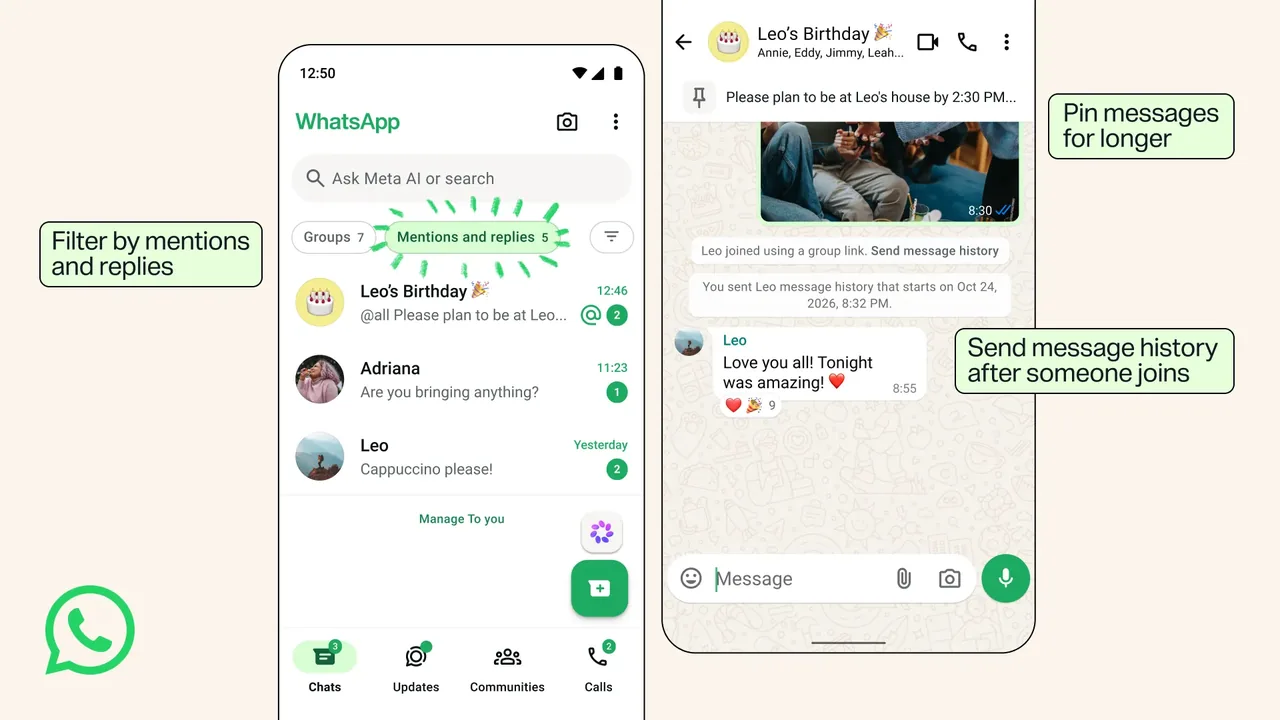
- Pin messages for longer: you can keep an important message pinned forever if you do not want to pick a time limit up front.
- Send message history after someone joins: earlier this year WhatsApp let you send recent history when adding someone. Now you can also send recent messages after they have joined by tapping their name in the chat. WhatsApp says those messages stay end-to-end encrypted like your personal chats.
- Group status: share a status with one group instead of your whole status audience. Group members can view, react, and add their own. Like regular statuses, these disappear after 24 hours.
- Filter by mentions and replies: a chat filter that shows unread group conversations where you were mentioned or got a direct reply, including @all messages.
WhatsApp also reminded people of older group tools that are easy to miss: private replies inside a group, polls that allow only one answer, and member tags so you can add context about yourself, like “Sam’s Dad” in a parents group.
Why forever pins are worth noticing
Until now, pinning a message meant picking how long it stayed pinned. That is fine for a weekend plan that should fall off the pin list. It is awkward for the standing note you want until you unpin it yourself: the Wi-Fi password for the cabin, the payment details for the group gift, the rehearsal address.
Forever means you decide when the pin ends. It does not mean the message is locked forever for everyone against their will. Treat it as a pin duration option, not a new kind of permanent broadcast.
If a pin holds a secret (a door code, a shared login), remember the whole group can still see it while it is pinned. Forever pin is convenience, not a vault.
Catching people up without screenshot spam
Sending recent history when someone joins was already useful. The new part is doing it retroactively. Someone joined yesterday, missed the planning thread, and you do not want to forward twenty messages one by one. Tap their name in the chat and send recent history when that control appears.
Still use judgment:
- Prefer history share over screenshots. Screenshots break out of WhatsApp’s end-to-end path and often include names you did not mean to spread.
- Do not dump history into a group that mixes strangers with family just because the button exists.
- If the group is noisy or sensitive, ask before you send a chunk of old messages to a new person.
Group status vs your normal status
Regular status goes to people who can see your status. Group status is for one group’s audience. That is the right tool for “practice moved to field 2” in the soccer chat without putting it on your wider status list.
Same 24-hour disappearing rule as normal status. Do not put anything in a group status that you would regret in a screenshot tomorrow. Reactions and added statuses from other members can stack up fast in a large group, so mute or stay selective if that gets noisy.
Mentions and replies filter
Muted groups are peaceful until you miss the one ping that was actually for you. The new filter surfaces unread group chats where you were mentioned, got a direct reply, or were included in @all. Use it as a catch-up lane, not as a reason to leave every group unmuted.
How to update and check on your own phone
- Update WhatsApp from the App Store or Google Play on every phone that has your account.
- Open WhatsApp once after the update so the new build actually launches.
- In a busy group, try pinning a low-stakes message and look for a forever / no time-limit option if it has rolled out to you.
- Open chat filters and look for the mentions and replies filter when it appears.
- For a new member who already joined, tap their name in the group chat and look for the option to send recent message history.
- Repeat on a second family phone if someone else shares the household but uses their own WhatsApp account. App updates are per device.
Rollouts can be gradual. If you do not see forever pins or the new filter yet, you are not broken. Update, wait a day, and check again. Do not install random WhatsApp APKs from third-party sites.
Do this / don’t do that
Do
- Update WhatsApp, then try forever pins on messages you already wished would stay pinned.
- Use retroactive history share instead of screenshot forwards when a new member needs context.
- Use group status for group-only updates that do not belong on your wider status list.
- Use the mentions-and-replies filter to catch up on muted groups.
Don’t
- Do not pin passwords, recovery codes, or one-time codes forever in a large group.
- Do not confuse this announcement with scheduled messages. Scheduling is still a separate beta story.
- Do not skip Linked Devices cleanup while you are in Settings. Remove old computers and tablets you no longer use.
- Do not download WhatsApp from unofficial stores.
Bottom line
On October 29, 2026, WhatsApp announced forever pins, retroactive group message history, group statuses, and a mentions-and-replies filter for group chats (WhatsApp Blog). On your own phone: update the app, confirm the new controls when they appear, pin the standing notes that used to fall off too soon, and keep secrets out of pins and statuses. That is the useful part for a normal home account.
Image: Official WhatsApp blog art showing the new group chat features (blog.whatsapp.com).