
iOS 27 CarPlay: which features actually work in your car
After iOS 27's CarPlay marketing push, here is the home-driver triage: what works in any CarPlay car, what needs carmaker support, and what needs Apple Intelligence plus the Siri AI waitlist.
 Michael Narehood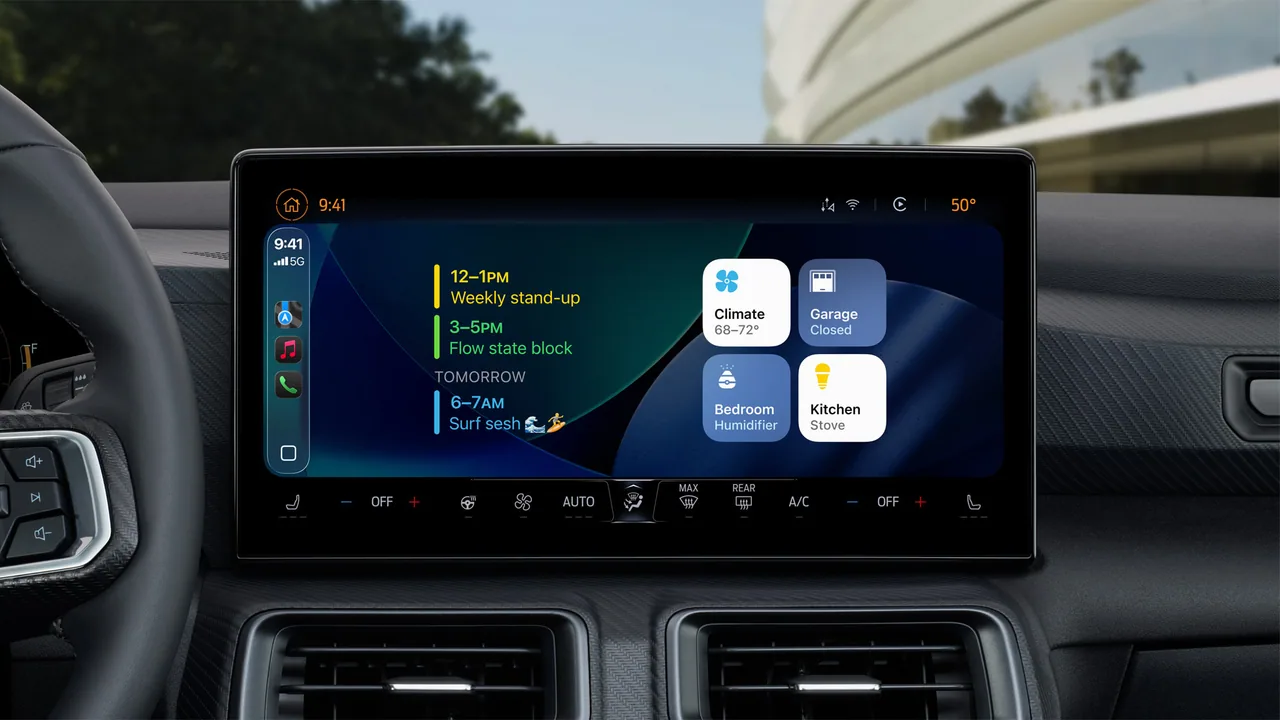
Apple released iOS 27 on September 14, 2026, and CarPlay got one of the louder marketing pushes in the update. The pitch sounds like every car suddenly gets video apps, smarter Maps, and a chatty new Siri. Reality is three buckets: features that land on any CarPlay vehicle from the phone side, features that need your carmaker to certify new hardware or software support, and features gated behind an Apple Intelligence phone plus Apple’s Siri AI waitlist.
This is the triage for normal drivers. For the broader OS list, see our iOS 27 features worth caring about piece. For day-one availability and the install path, use iOS 27 is out today and the update day guide. Official framing lives in Apple’s major OS availability Newsroom post and the CarPlay page. Independent triage that matches what I am seeing in the wild: MacRumors on which iOS 27 CarPlay features actually work (September 17, 2026).
Works in any CarPlay vehicle (phone-side)
If your car already does wired or wireless CarPlay and your iPhone is on iOS 27, these should show up without waiting on a dealer firmware flash.
Custom Home Screen widgets. CarPlay is no longer stuck with Apple’s tiny stock widget set. Compatible widgets from your iPhone Home Screen can sit on the CarPlay dashboard. Path: Settings → General → CarPlay, tap your car, then Widgets → Add Widgets. Drag to rearrange, tap to remove, and decide whether Smart Rotate and Widget Suggestions are useful or annoying. This is the quiet win for people who want glanceable info (weather, calendar, health widgets from apps that support them) without digging through icons while parked.
Audio scrubbing and a proper mini-player. Now Playing finally gets a progress bar you can drag, plus a persistent mini-player so artwork and controls stay visible while you browse. If you have ever mashed skip fifteen times to find a podcast chapter, this is the quality-of-life change you actually feel on day one.
Apple Music Filters. Inside Apple Music on CarPlay, you can filter the library (Favorites, All Playlists, and similar categories). Apple says third-party music apps can adopt the same pattern. Your car does not need a special badge for this.
Celosia wallpapers. The shared “Celosia” wave design from the iOS 27 / macOS 27 family shows up in CarPlay with 14 color options. Cosmetic only. Still nice if your dash wallpaper looked stuck in 2021.
Maps natural-language search. Apple extended natural-language routing requests into Apple Maps on CarPlay. Asking to avoid tolls or highways is the practical example. This is still Maps on CarPlay, not a promise that every navigation wish becomes magic.
Better wireless reliability, GPS, and heading. Apple describes more dependable wireless CarPlay, improved GPS accuracy, and better navigation heading detection. Those are phone-side changes. You do not need new car hardware for them. Your results still depend on antenna placement, case interference, and how clean the car’s wireless CarPlay implementation already was.
Needs the right car (carmaker support)
These are the keynote demos that make people assume their 2019 hatchback is suddenly a theater.
Video apps in CarPlay. Playback in the CarPlay UI needs the automaker to certify AirPlay video for that vehicle, and the car has to share a parked / drive state with iOS. Playback is meant for parked use and should fall back to audio if you shift into drive. As of mid-September 2026 reporting (MacRumors), no manufacturer had announced support yet. An iOS update alone cannot invent that certification. Do not buy a new phone expecting cabin video on a car that never shipped the handshake.
Route sharing to the vehicle cluster or HUD. Navigation apps can pass richer route data (including EV charging stops and range where supported) to the car’s own instrument cluster or HUD. Again: the car has to support it. Some newer vehicles already show partial cluster maps; others will show nothing new until the brand ships an update. Ask your dealer or check the carmaker’s CarPlay notes before you rearrange your commute around a feature you cannot see.
Needs a supported iPhone + Siri AI waitlist
Siri AI in the car is not the same gate as “installed iOS 27.” You need an Apple Intelligence capable iPhone, then you join the waitlist from Settings → Siri on the phone. In the car, the upgraded assistant can handle more back-and-forth conversation, and chats can sync to the Siri app on the iPhone so you can continue later. If your phone is old enough for iOS 27 but not for Apple Intelligence, classic Siri and the phone-side CarPlay improvements above still apply. The chatty demo reel does not.
Region and language footnotes from Apple still matter for Siri AI (English beta first, with EU and China holdouts called out in Apple’s Newsroom materials). Driving across a border does not override those product rules.
One more gradual piece: voice control for third-party apps
Apple gave developers a voice control template that more CarPlay app categories can adopt. Nothing shows up until each app team ships it. Treat this as a slow rollout, not a day-one checklist item. If your favorite parking or EV app still needs taps, that is a developer schedule problem, not a broken OS install.
Do this / don’t do that
Do this
- Update the iPhone to iOS 27, confirm CarPlay reconnects, then add the two or three widgets you actually glance at.
- Try audio scrubbing on a long podcast before you judge the whole CarPlay refresh.
- Use natural-language Maps requests for tolls and highways on a familiar trip once, parked, so you know the phrasing that works for you.
- If you want Siri AI in the car, check the Apple Intelligence model list first, then join the waitlist. Patience is part of the beta.
Don’t do that
- Do not assume video apps or cluster route sharing work because the keynote showed them.
- Do not blame CarPlay wireless “bugs” on iOS 27 alone until you rule out case, USB-C adapter quality (for wired), and the car’s known quirks.
- Do not rearrange widgets into a dashboard full of animated junk you will never look at while driving. Parked setup time is fine. Driving distraction is not.
- Do not expect third-party app voice templates overnight.
Bottom line
For most people with a normal CarPlay car and an iPhone on iOS 27, the real upgrades are widgets, audio scrubbing, Music filters, Celosia wallpapers, smarter Maps phrasing, and phone-side wireless / GPS polish. Video in CarPlay and deep cluster / HUD route sharing wait on carmakers. Siri AI in the cabin waits on an Apple Intelligence phone and Apple’s waitlist. Update the phone, set up the widgets you will use, and treat the rest as “nice if your car and waitlist catch up,” not as a reason to panic-buy hardware.
Image: Apple Newsroom press photo (CarPlay widgets, from Apple’s WWDC25 / iOS CarPlay widgets still Apple-WWDC25-iOS-26-CarPlay-widgets; used because the iOS 27 OS-availability Newsroom post lacked CarPlay stills).


