
iOS 27 arrives September 14: back up, then update your iPhone
Apple says iOS 27 is available starting September 14, 2026, with Siri AI rolling out in English. Free space, back up, update on Wi-Fi, then confirm the version.
 Michael Narehood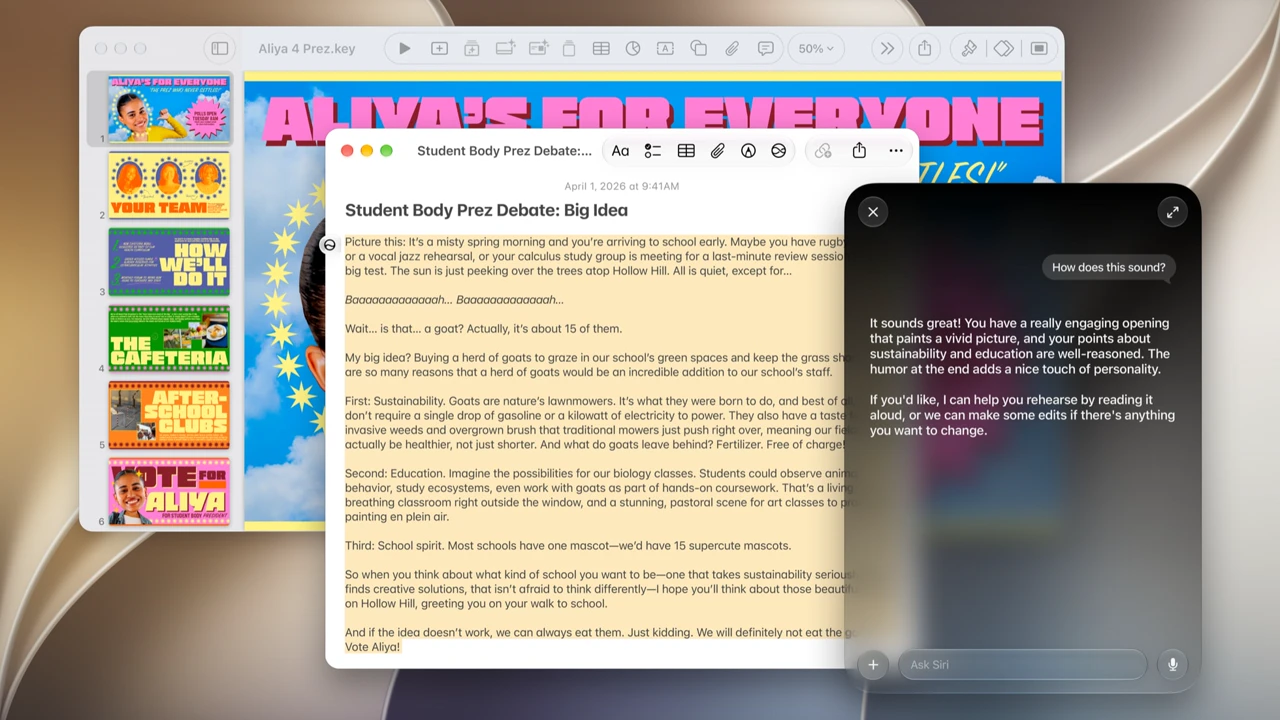
If your everyday phone is an iPhone, mark Monday, September 14, 2026. Apple’s iOS 27 page says the release is available starting 9.14, and that Siri AI is rolling out in English. This is the free system update day for compatible phones, not another hardware shopping list.
Hardware from Apple’s September 9 “Surprise and Shine” event is covered elsewhere on this site. This piece is only about getting onto iOS 27 without turning update morning into a half-dead battery and a half-finished install.
What Apple is shipping (in plain terms)
From Apple’s iOS page: the headline is a more capable Siri AI assistant, plus design refinements (including a Liquid Glass opacity slider), performance work, Safari improvements such as topic-grouped tabs and page-change alerts, stronger child-safety controls for families, and a long list of app-level upgrades. Treat marketing pages as the feature brochure. Your job on day one is simpler: install the update when it reaches your phone, then confirm you are actually on iOS 27.
Apple lists a wide set of supported models on that same page, including current iPhone 18 / Duo / Air lines and older devices going back through the iPhone 11 and SE generations. If your model is on Apple’s list, you are in the queue. If it is not, you stay on your current major release.
Siri AI starts in English as a rollout, not a guarantee that every feature lights up for every region and language on day one. Apple’s footnotes on the iOS page are the source of truth for availability quirks.
Before you tap Update
- Plug in and use Wi-Fi. Large OS downloads dislike a thin cellular connection and a 12% battery.
- Free a few gigabytes. Settings → General → iPhone Storage. Offload unused apps or clear big video downloads if the phone is packed.
- Back up first. Use iCloud Backup (Settings → [your name] → iCloud → iCloud Backup → Back Up Now) or a computer backup you trust. An update is routine. A restore after a bad flash is not the moment to discover you never backed up.
- Leave beta profiles alone unless you mean to stay on beta. If you were on a public or developer beta, read Apple’s update guidance for leaving beta before you expect the public build.
- Know your Apple ID password and any screen-time / device passcode. Interrupted installs sometimes ask again.
Update steps on the day
- Open Settings → General → Software Update.
- Wait for iOS 27 to appear. Apple stages releases. If Monday morning shows nothing yet, check again later on Wi-Fi.
- Tap Download and Install (wording can vary slightly by version).
- Stay on Wi-Fi, keep the phone powered, and let it restart when asked.
- After the welcome screens, open Settings → General → About and confirm the iOS version line shows 27.x.
If the download stalls, pause other heavy uploads, reboot once, and try again on a different network if home Wi-Fi is flaky.
After you are on 27.x
- Give the phone ten quiet minutes on Wi-Fi so Photos, Messages, and iCloud can settle.
- Re-check Settings → Battery and Screen Time if something feels off after a major jump.
- If you use a Watch, plan the matching watchOS update from the Watch app once the phone is healthy. Apple’s September software wave usually lands the same week.
- Read Apple’s own feature notes later for Siri AI, Camera helpers, and parental controls. Day-one priority is a finished, verified install.
Do not do that
- Do not start the download on 5% battery in a parking lot on cellular and hope for the best.
- Do not skip the backup because “updates always work.”
- Do not assume every Siri AI demo from the keynote is already on in your language and region on hour one.
- Do not wipe the phone to “make the update cleaner” unless Apple Support or a real failure forces that path.
If you share a family phone setup
Parents who manage a child’s iPhone should decide before update day whether Screen Time, Ask to Buy, and communication-safety settings should stay as they are. iOS 27 adds clearer parental controls on Apple’s marketing page (Ask to Browse, time allowances, schedules). You do not need to redesign the family rules during the install itself. Finish the update, confirm the version, then revisit Settings for family features when everyone has a charged phone and ten quiet minutes.
Shared Apple IDs are still a bad idea for backups and Find My. If two people sign into the same Apple ID on purpose, expect iCloud Backup and photo libraries to fight each other. Fix that identity mess on a calm evening, not mid-download.
Bottom line
Apple says iOS 27 is available starting September 14, 2026, with Siri AI rolling out in English. On update day: free space, back up, use Wi-Fi and power, install from Software Update, then confirm About shows iOS 27. That is the whole home-phone job.
Image: Apple Newsroom press photo (Siri AI / iOS 27).


