
iOS 27 is out today: Siri AI, Liquid Glass controls, and more for home iPhones
Apple released iOS 27 on September 14, 2026. Here is what home iPhone users get on day one, how Siri AI rolls out, and where to tap Software Update.
 Michael Narehood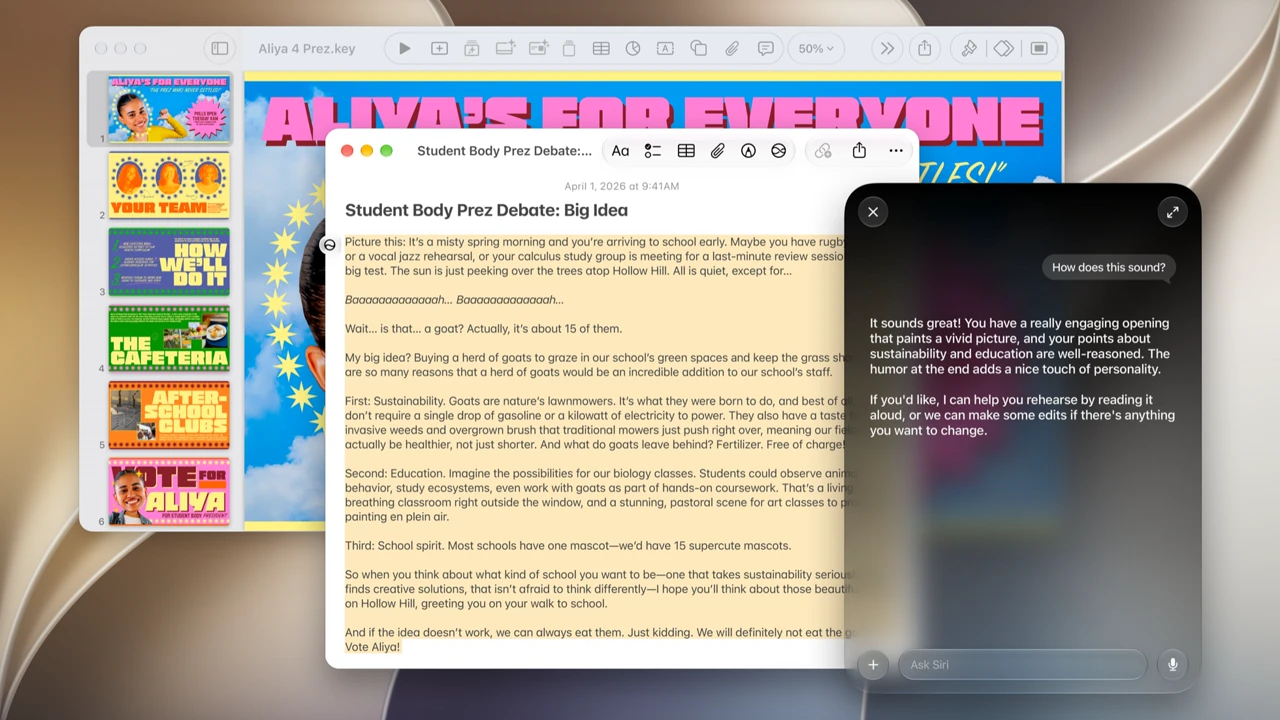
iOS 27 is available today, September 14, 2026. Apple’s free software release for compatible iPhones is live. The headline is a more capable Siri AI assistant powered by the next wave of Apple Intelligence, plus everyday upgrades in design, Safari, Photos, and family controls.
This is the release overview. If you want the back-up-then-install checklist, use our separate iOS 27 update day guide. Official sources: Apple’s Siri AI Newsroom post and the iOS page.
How to get it
- Plug in, join Wi-Fi, and open Settings → General → Software Update.
- Download and install iOS 27 when it appears. Apple stages releases, so morning quiet is normal.
- After restart, confirm Settings → General → About shows 27.x.
Back up first if you have not already. The update day guide walks through that sequence.
Siri AI: the day-one headline
Apple describes Siri AI as a profoundly more capable and personal assistant. In plain terms for a home phone:
- Personal context: ask about something buried in Messages, Mail, Photos, or Notes and get a useful answer instead of a generic web blurb.
- Onscreen awareness: ask about what is on the screen and take related actions.
- Broader app actions: draft, edit, share, and move tasks across the apps you already use.
- A dedicated Siri app: revisit conversations and continue them across your Apple devices when Apple says that sync is available for your setup.
- Writing help: draft or rewrite almost anywhere you type, with style matching in Mail and Messages when Apple enables it on your device.
- Camera / visual smarts: a Siri mode in Camera plus wider Visual Intelligence behavior on supported hardware.
Apple says Siri AI begins rolling out today as a beta in English, with French, Japanese, Korean, Portuguese, and Spanish expected next month. Treat that as a staged rollout, not a promise that every demo from the keynote is already on your phone tonight.
Region and language limits (from Apple)
Apple’s Newsroom footnotes matter as much as the demos:
- European Union: Siri AI is not available initially on iOS, iPadOS, and watchOS. Features that depend on Siri AI are held back there too while Apple works on a path that keeps its privacy and security model intact. Mac and Apple Vision Pro in the EU can still get Siri AI when set to a supported language, per Apple.
- China: Siri AI and the other new Apple Intelligence features in this wave are not available while Apple works through regulatory requirements.
- Devices and languages: Apple Intelligence / Siri AI need a supported iPhone (Apple lists iPhone 16 and later, plus iPhone 15 Pro / Pro Max among others) with supported Siri and device language settings. Some features have daily usage limits. Apple’s pages are the checklist if your model or country looks missing.
If Software Update offers iOS 27 but Siri AI is quiet, you may still be in a language, region, or device gate. That is expected on day one.
Other home-user highlights in iOS 27
From Apple’s iOS marketing and the same Newsroom package:
Liquid Glass controls. Apple says Liquid Glass readability and contrast are improved, with sharper icons and a slider so you can move the look from ultraclear to fully tinted. If the new glass effect felt too strong on earlier betas, this is the control to try after you update.
Safari helpers. Tabs can group into topics automatically. Notify Me can watch a page for changes such as a price drop or restock and alert you when something moves.
Photos and Image Playground. Stronger editing tools (Apple highlights reframing, extend, and a more capable Clean Up), plus Image Playground that can create photorealistic images when Apple Intelligence is on.
Mail, Messages, Phone, Calendar, Shortcuts, Home. Smarter replies and suggestions, call context hints when you phone a business, simpler calendar edits from a short description, Shortcuts you can describe in plain language, and clearer Home camera activity summaries.
Family and child safety. Setup Assistant can limit which system apps a child’s iPhone starts with. Ask to Browse makes kids request permission before opening new websites. Screen Time controls get a clearer layout so parents can adjust access quickly.
Apple also teases Watch audio-intelligence and Health app updates later this year. Those are not the reason to update an iPhone today; they are a heads-up for Watch owners on the matching OS wave.
What this is not
- Not a new iPhone shopping guide. Hardware from Surprise and Shine is covered in our event overview.
- Not a full install runbook. Use the update day checklist for backup, free space, and verify steps.
- Not a guarantee that every Siri AI feature is live in your language and country tonight.
Bottom line
iOS 27 is out today. Update from Settings → General → Software Update when the build reaches you. Expect Siri AI in English beta on supported phones outside Apple’s EU and China holdouts, plus practical upgrades in Liquid Glass, Safari, Photos, and parental controls. Read Apple’s Newsroom post and iOS page for the official feature and availability language, then finish the install checklist before you start chasing every new toggle.
Image: Apple Newsroom press photo (Siri AI / iOS 27).


