Offline speech on your iPhone
On November 23, 2026 TheStage AI launched ASRKit and the free Edgent app for on-device meeting notes, dictation, and voice chat on iPhone and Mac.

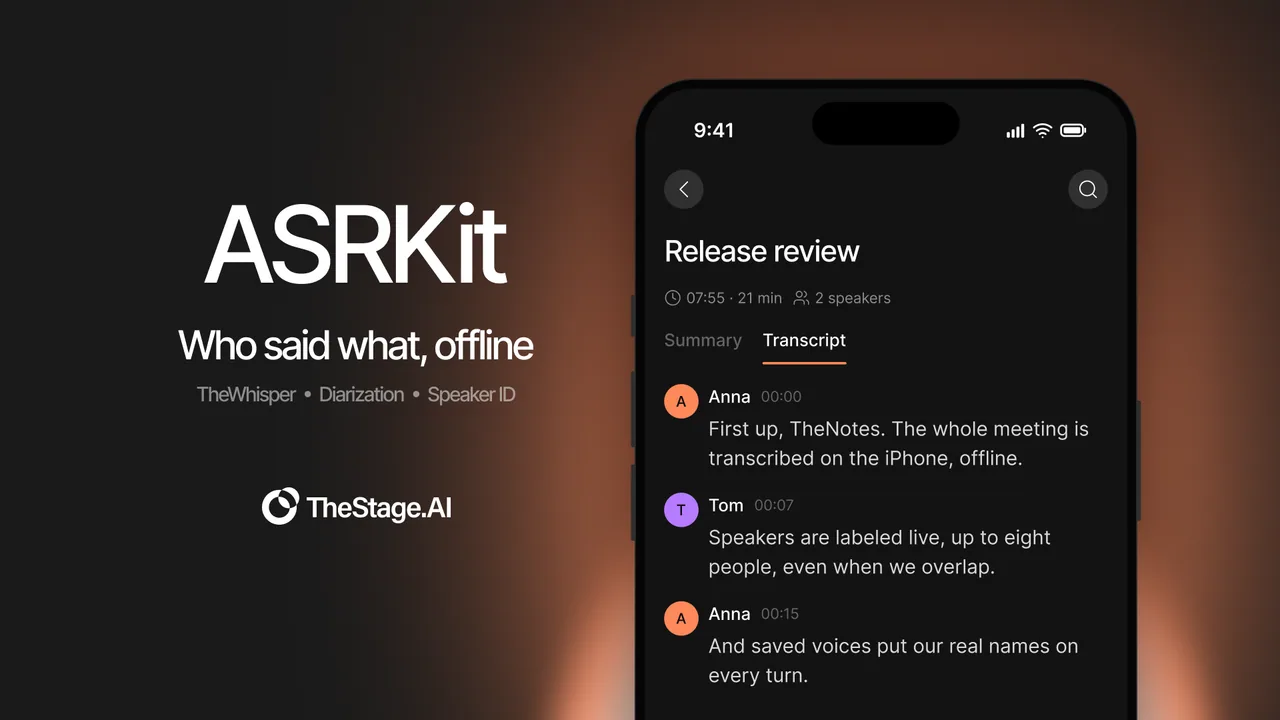
Most voice assistants upload your audio. On November 23, 2026, TheStage AI launched ASRKit and pointed people at Edgent, a free app that keeps meeting notes, dictation, and voice chat on the device.
That is happy privacy news for anyone who wants captions or a meeting summary without sending the recording to a transcription vendor.
What TheStage shipped
From TheStage’s ASRKit and Edgent post and the Apple SDK README:
- ASRKit is an on-device speech stack for iOS 18+ and Apple silicon macOS 15+. Audio stays on the device after setup.
- The speech models include TheWhisper Large V3 Turbo (about a 400 MB on-device pack, 28 languages) and a smaller Parakeet-TDT 0.6B v3 pack (about 250 MB, 25 European languages). TheStage publishes its own speed and accuracy numbers on that page.
- Speaker labeling runs on device too: Nemotron-3 Diarization (up to 8 speakers, overlapping speech) plus a tiny Speaker ID model that can name saved voices.
- Edgent is the consumer app built on that stack. After the first model download, TheStage says meeting summaries and voice chat can work without a network, including in airplane mode.
- On iPhone, Edgent covers live meeting notes with speakers, text chat, and interruptible voice conversations.
- On Mac, Edgent can sit in the menu bar for system-wide dictation into whatever text field has focus, plus a floating assistant shortcut.
- TheStage also published ASRKit for developers (Swift, and related SDK surfaces). Everyday readers can ignore the SDK and just try Edgent.
- TheStage’s public materials describe a free Edgent experience and point to TestFlight for the Apple builds. Availability and store listing can change; use the links TheStage publishes.
Those WER, tokens-per-second, and watt figures on the blog are TheStage’s lab claims on named hardware. Your iPhone or Mac will feel different.
Why home users should care
If you record a parent-teacher call, a study group, or a doctor visit summary for yourself, “offline” means the audio does not have to hitch a ride to someone else’s servers for captions. Speaker labels make a multi-person recording usable later. Mac dictation into any app is the boring win: talk into Mail or Notes without another cloud account.
This is a different product from Google’s AI Edge Gallery voice demos we covered in Offline voice on your phone. Gallery is Google’s on-device chat and language-teacher sandbox. Edgent is meeting notes, dictation, and a local voice assistant from TheStage.
You still download large models, burn battery while listening, and trust TheStage’s packaging. Offline after download is not the same as “no company involved ever.”
How to try it on your own devices
- Open TheStage’s Edgent / ASRKit announcement and follow the official install path (TestFlight or store link they publish). Prefer Apple silicon Macs and a recent iPhone that meets the stated OS floors.
- Launch Edgent once on Wi-Fi, download the speech model you plan to use, then flip on Airplane Mode for a short smoke test.
- Record a two-minute conversation (or play a podcast into the mic) and confirm you get a live transcript with speaker turns.
- On Mac, hold the dictation shortcut and speak into Notes or Mail. Confirm text appears where the cursor is.
- Save a short voice sample if you want named speakers later, then re-check a meeting note after the final labeling pass.
- If quality dips, try the smaller Parakeet pack, free some storage, or reboot before you blame the mic.
Do not install random “Edgent APK” mirrors for iPhone. Stay on TheStage’s linked builds.
Do this / don’t do that
Do
- Prove airplane-mode transcription once after the model download.
- Keep only the language packs and models you actually use.
- Read TheStage’s own post for the current pack sizes and OS requirements.
Don’t
- Do not assume every voice feature in every app suddenly went local.
- Do not record other people secretly. Get consent where the law and basic manners require it.
- Do not invent accuracy claims beyond what TheStage published for its test sets.
Bottom line
On November 23, 2026, TheStage launched ASRKit and the Edgent app for on-device meeting notes, dictation, and voice chat on iPhone and Mac. On your own devices: install from TheStage’s official link, download a model, test once offline, and keep the recordings you care about under your control.
Image: Official artwork from TheStage AI’s ASRKit and Edgent announcement.