iPhone Duo is here: iOS 27.1 is Duo-only, everyone else stays on 27.0.1
Apple's foldable iPhone Duo arrives October 23, 2026 running iOS 27.1. Apple lists 27.1 for Duo only with no published CVEs. What Duo buyers should check at setup, and why other iPhones stay on 27.0.1.


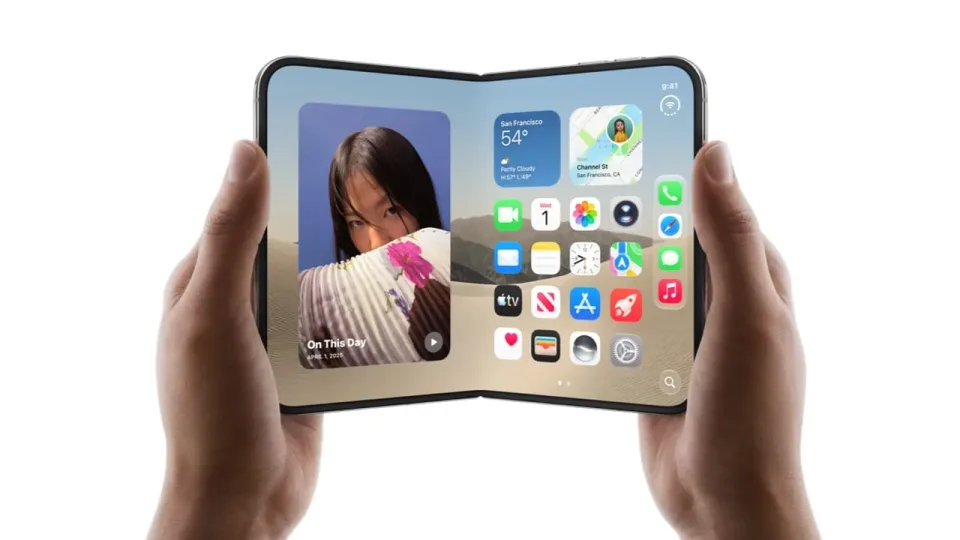
Image: Apple Newsroom photo (iPhone Duo launch, Apple Jing’an, Shanghai).
Launch day is not the same as “everyone should install 27.1.” On Friday, October 23, 2026, Apple’s first foldable phone, iPhone Duo, reaches customers worldwide following Apple’s October 22 store-debut announcement. Apple’s security releases page explicitly states that the latest version of iOS and iPadOS is 27.0.1, and 27.1 for iPhone Duo only, listing iOS 27.1 on 23 Oct 2026 for iPhone Duo with no published CVE entries.
If you bought Duo, finish setup and install the software update Apple offers. If you did not buy Duo, stay on iOS 27.0.1 (or whatever Apple currently offers your model) and ignore FOMO about the 27.1 number.
For product background and pricing from the September unveil, see our earlier iPhone Duo overview. This post is the launch-day software and setup note.
What Apple says about versions today
From Apple’s security releases page (updated October 23, 2026):
- Latest iOS and iPadOS for standard devices: 27.0.1
- 27.1 for iPhone Duo only
- iOS 27.1 row: available for iPhone Duo, released 23 Oct 2026, “This update has no published CVE entries.”
- iOS 27.0.1 and iPadOS 27.0.1 row: available for iPhone 11 and later and supported iPads, released 28 Sep 2026, also “This update has no published CVE entries.”
“No published CVE entries” means Apple has not listed specific security fixes for the public in that release note line. It does not mean “skip updates forever.” It does mean Duo’s 27.1 is not an emergency security patch train for every other iPhone in the house.
Apple’s October 22 developer experiences update explains why iOS 27.1 (and Xcode 27.1) exists as a hardware-scoped release: the iOS 27.1 SDK adds the foldable-specific APIs for iPhone Duo’s inner and outer displays, Split View multitasking, hinge-angle detection, scene accessories across both screens, and the first under-display camera on iPhone. Treat Settings -> General -> Software Update on the device in your hand as the source of truth for what applies to your phone.
If you just got an iPhone Duo
Do the boring setup path before you chase foldable party tricks.
- Unbox and power on on a trusted network (home Wi-Fi you control, not a random open hotspot).
- Use Personal Setup or Quick Start from your old iPhone if you are migrating, as Apple’s launch coverage highlights. Prefer a direct device-to-device transfer over an old backup when you can.
- Sign in with your Apple Account (Apple ID). Do not use a shared family password as the device owner account.
- Open Settings -> General -> Software Update and install whatever iOS 27.1 build Apple offers. Duo ships with 27.1; take any launch-day update if one appears during or right after setup.
- Confirm the version afterward: Settings -> General -> About. You want 27.1 on Duo.
- Turn on Find My, set a strong device passcode, and enroll Face ID before you load banking apps.
- Update App Store apps after the system update finishes. Apps optimized for the foldable display carry a Made for iPhone Duo badge on the App Store, and Apple’s developer experiences post highlights early Split View and posture-aware updates across streaming, productivity, and travel apps.
Hardware care still matters on day one: open and close the hinge smoothly without forcing it, keep pocket grit out of the fold, and pick a case only after you see how you actually prop and hold the device.
If you do not own an iPhone Duo
You are not behind.
- Check Settings -> General -> Software Update on your current iPhone.
- You should see iOS 27.0.1 (or a later release Apple publishes for your model), not 27.1.
- Do not hunt IPSW files labeled 27.1 for a non-Duo phone. Apple’s table scopes 27.1 strictly to iPhone Duo.
- Wait for the next shared iOS 27 release that lists iPhone 11 and later in the “Available for” column. Until then, keeping 27.0.1 and any Background Security Improvements installed is enough.
If Software Update says your phone is up to date on 27.0.1, that matches Apple’s official table today.
Do this / don’t do that
Do
- Duo owners: finish setup, install any offered 27.1 update, and verify 27.1 in About.
- Everyone else: stay current on 27.0.1 (or the latest listed for your device) and wait for the next shared release.
- Read Apple’s security releases list when version numbers get confusing. The “Available for” column matters more than social-media version screenshots.
Don’t
- Do not assume 27.1 is a must-have security jump for iPhone 18 or older models. Apple scopes 27.1 to iPhone Duo and lists no published CVEs for that row.
- Do not sideload random IPSWs from forums to force a Duo-only build onto other hardware.
- Do not skip Find My and a strong passcode because you are busy testing Split View or taking photos for group chat.
Bottom line
iPhone Duo’s availability day is October 23, 2026 in more than 70 countries and regions (with 28 more following on October 30). It runs iOS 27.1, which Apple documents as iPhone Duo only with no published CVE entries (Apple security releases, Newsroom launch coverage). Duo buyers: update during setup and verify About. Everyone else: ignore the 27.1 FOMO, keep iOS 27.0.1 current, and wait for the next release that lists your phone.