iPhone Duo inner display cracks: what is reported, what Apple said
Days after launch, some iPhone Duo owners report cracked inner screens and bright pixel lines near the hinge. Apple says a small number of units are affected and owners should contact AppleCare for a replacement. How to check yours.

Launch week for a foldable is never only about the keynote. Within days of iPhone Duo going on sale October 23, owners began posting nearly identical damage on the inner display, and tech sites picked it up. On October 26, 2026, Apple told several outlets it is aware of an issue affecting the inner display on a small number of units, and that affected owners should contact AppleCare for a replacement.
This is not a repeat of the launch-day software note, which covered iOS 27.1 for Duo. This one is about reported hardware screen failures and what to do if your phone shows them.
What people are reporting
Coverage from Ars Technica, The Verge, 9to5Mac, and BBC News describes a consistent pattern:
- The damage is on the inner folding OLED, along or near the crease, not on the outer screen.
- Many photos show several bright lines starting just below the middle of the display and running to the bottom and right edges.
- Some units also show dead-pixel lines following the crease.
- Owners describe the hinge feeling tighter, with unusual resistance or a click or crunch when opening or closing, before the lines appear.
- Failures show up fast. Ars Technica says most affected phones fail within about a day, and a few owners say it happened before they finished setup.
9to5Mac says many Reddit reports are legitimate but a handful are fake, AI-generated images, and the BBC also notes some images may have been made with AI. Apple has not said how many phones are affected. Treat “every Duo is dying” posts as noise unless your own screen matches the real symptoms.
iFixit’s teardown (summarized by MacRumors) lists pressure, a trapped particle, repeated bending, or a manufacturing defect as possible causes. Its CT-scan model puts the breaks near a spot where the hinge support changes shape below the cable crossing, and it suggests a hinge part that is meant to retract may not be doing so. Ars Technica walks through the same theory. That is teardown speculation, not an Apple diagnosis, and iFixit itself says there is no clear answer yet. Do not open the phone to look for yourself.
What Apple said
Apple’s statement, as published by 9to5Mac and The Verge (which got it from an Apple spokesperson), and also given to Bloomberg and CNBC:
The response to iPhone Duo from early users has been incredibly positive, and we are seeing exciting things from developers who are rapidly updating their apps to take advantage of its unique form factor. We are aware of an issue impacting the inner display on a small number of iPhone Duo units. If users experience issues with their iPhone Duo display, they should contact AppleCare for a replacement.
Extra context those outlets attribute to Apple:
- The issue affects a small number of units, and most units are not susceptible.
- On phones that have the defect, the problem shows up quickly.
- Per 9to5Mac, you do not need AppleCare+ to get a replacement for this problem, and if you bought from a carrier, you should contact AppleCare directly, not the carrier.
As of this writing, Apple has not published a support document that names a cause, lists affected serial numbers, or offers a software fix. The official path in the statement is contact AppleCare for a replacement.
How to check your own Duo
A calm look and feel check is enough. You do not need tools.
- Open the phone fully on a clean table. Look at the inner screen with a light wallpaper or a mostly white web page.
- Scan the crease and the area just below the middle of the screen for bright lines, black dead lines, or a visible crack.
- Open and close the hinge slowly a couple of times. Note any new tightness, grinding, or clicking that was not there out of the box.
- If the screen looks normal and the hinge feels smooth, keep using the phone normally. Do not force the fold.
- If you see the bright-line or crack pattern, stop opening and closing it to test. Back up to iCloud or your computer, then contact AppleCare through Apple Support or book an Apple Store appointment for the replacement Apple described.
Also open Settings > General > Software Update and install what your Duo offers. Apple released iOS 27.2 on October 26 (9to5Mac), which adds Apple Pencil support for Duo, but Apple has not described it as a fix for this display problem. Staying current is good hygiene, not a cure. Bright lines and cracks are physical damage to the panel, so expect a swap, not a patch.
Warranty, AppleCare, and returns
- Apple’s stated path for this defect: contact AppleCare for a replacement (9to5Mac, The Verge). Per 9to5Mac, AppleCare+ is not required for this issue.
- One-year limited warranty: Apple’s warranty covers manufacturing issues for one year from purchase (Apple warranty coverage). Keep your receipt handy.
- Change-of-mind returns (bought from Apple): Apple’s Returns and Refunds page gives you 14 calendar days from the date you received an item bought directly from Apple, in original condition with its parts and packaging. Phones bought from a carrier or another store follow that seller’s return policy.
- What it would cost otherwise: Apple’s published out-of-warranty estimate for inner display damage on Duo is $999, or $99 with AppleCare+ (The Verge, Apple repair pricing). That is why the replacement path Apple described for this issue matters. Apple inspects each phone before setting a final fee, so do not treat a quote from a blog as your bill.
- Getting the swap: One owner in Australia told The Verge an Apple Store replaced the phone “on the spot,” and the BBC describes a New York owner who posted his new phone next to the broken one and thanked an Apple Store there. Ars Technica notes spares may be tight. If you are affected, start an Apple Support case or book an appointment early, and mention Apple’s statement about the inner display issue.
If your screen is fine and you simply regret the purchase, that is a return under the 14-day (or retailer) window, not the defect replacement.
Should you wait for an update?
If the inner display already shows the crack or bright lines: do not wait for a software fix. Apple’s public guidance is a replacement through AppleCare. Start the case now.
If your Duo looks and feels normal: keep using it. Apple says most units are not susceptible and that defective ones show the problem quickly. Apple has not told owners to stop using their phones. Keep the hinge area clean, keep it out of sand and pocket grit, and install software updates for ordinary bug and security fixes. If you already know you want to return the phone for other reasons, do not let the 14-day window run out while you wait and see.
Apple has not said any iOS update will repair a physically damaged screen. Do not sit on a broken $1,999 foldable hoping the next update fixes cracked pixels.
Do this / don’t do that
Do
- Check the inner screen and the feel of the hinge in your first days with the phone.
- Contact AppleCare directly (not the carrier) if your phone matches the reported damage.
- Back up before you hand the phone over for a swap.
- Keep your proof of purchase and note when the symptoms started.
Don’t
- Do not assume every social media photo is real. Some fakes are circulating (9to5Mac, BBC).
- Do not take apart the hinge or peel off the inner screen’s cover layer to check. Apple designed the layer to be replaced by service, not by owners.
- Do not pay an out-of-warranty screen quote before asking Apple about the replacement it announced for this issue.
- Do not treat this as proof that every Duo will fail. Apple says a small number, and no outside outlet has a real count.
Bottom line
Some early iPhone Duo buyers report inner display cracks and bright pixel lines near the hinge, often within the first day (Ars Technica, The Verge). On October 26, 2026, Apple said it is aware of an issue on a small number of units and that affected owners should contact AppleCare for a replacement (9to5Mac). Check your inner screen. If it matches, start the swap. If it does not, keep using the phone and skip the doom scrolling. For launch-day software context, see our October 23 iPhone Duo and iOS 27.1 note.
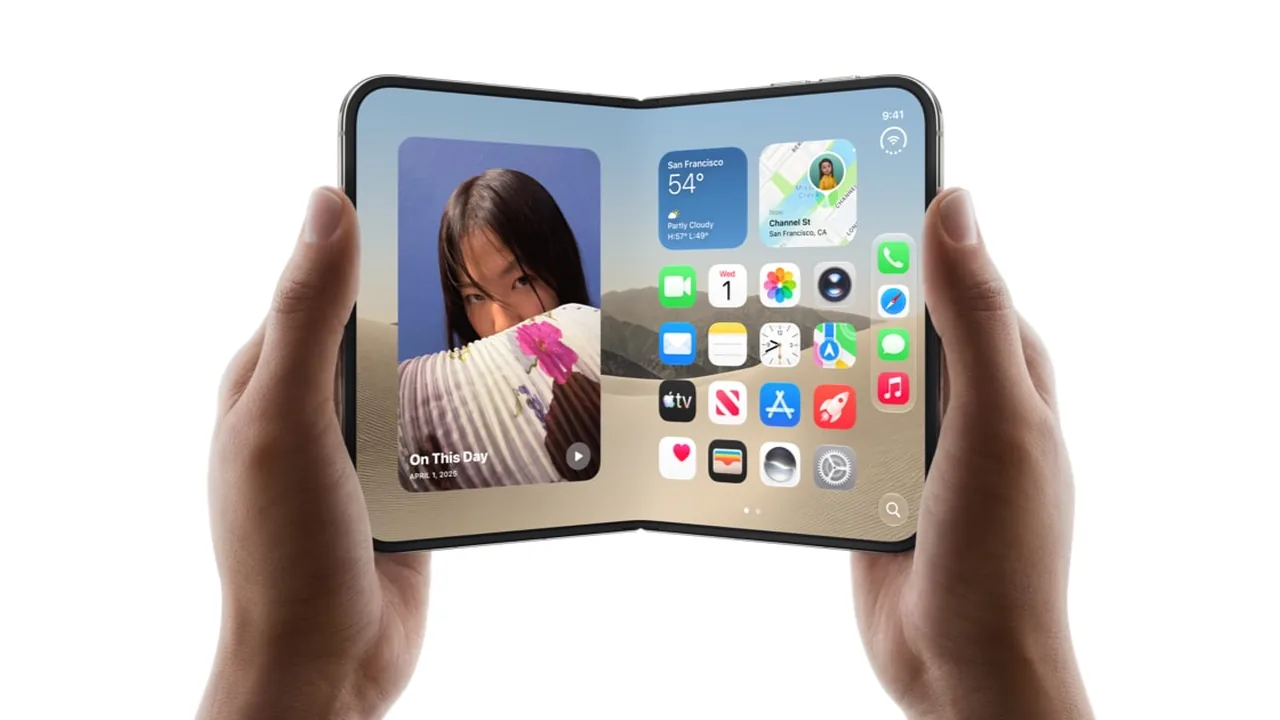
Image: Official Apple Newsroom photo of iPhone Duo opened in two hands, from the September 2026 unveiling (apple.com).